This guide covers the platform itself — how the main tabs are arranged, what the icons you see everywhere actually do, and how to call up any stock even when you don’t know its symbol. Ten minutes here makes every other part of the platform easier to follow.
You can read straight through, or use the contents list to jump to what you need. Every section below is also a standalone article — the “Open as article” link under each one takes you to it on its own page, if you want to bookmark or share just that piece.
Finding your way around
The platform is organized around a handful of top-level tabs. These two short pages show what lives where and a few habits that make moving around faster.
Top Level Navigation
Designed so trading workflow makes sense.
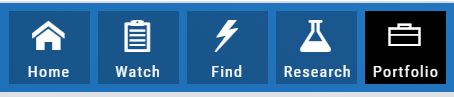
Home provides an overview of the current market from charts to maps and customize your own view.
Watch more detail of selected stocks matching overall outlook.
Find identify opportunities from scans, strategies, outlook and more.
Research gives you all the detail you need on the intuitive Dashboard.
Portfolio keeps your accounts, trades and journal in one place.
The icons, decoded
Small icons carry a lot of the platform’s shortcuts — sending a symbol somewhere, acting on a result, reading a Score at a glance. This section names each one and shows what it does.
Icon Navigation
More than a picture, icons will help guide you through the trading process.
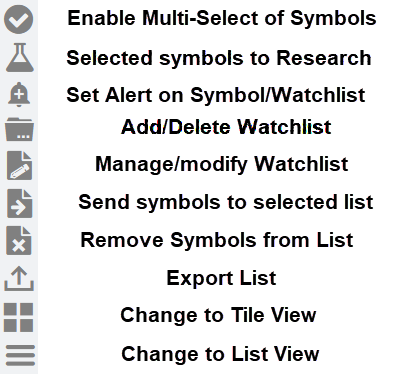
This graphic shows the function of some of the icons found in The Trade Tool.
Hint: Most icons will display a short description of its function or purpose by hovering the cursor over it.

Smart Action Icon
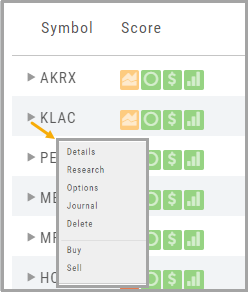
The Smart Action Icon  adjusts available features depending upon where you are in the trading platform.
For Stocks you can ‘Buy’, ‘Sell’, view ‘Options’, etc.
Any Strategy-specific options scan will have ‘Analyze’ and ‘Trade’ in the Action Icon Menu. You can click ‘Analyze’ to see the trade in the options chain. From there, you can Edit the structure or click ‘Trade’ to submit the trade to your Brokerage Account and Journal.
Other Navigation
Icons = Navigation
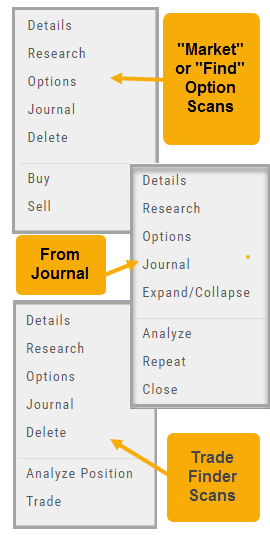
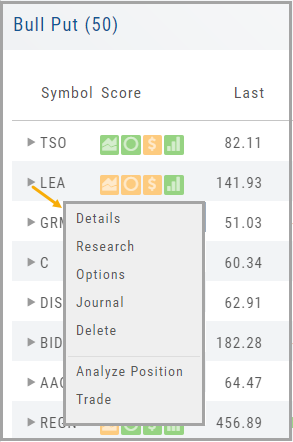
The Action (Arrow) icon will provide different actions depending on where you are in the platform. For example if you are in the Market or Find tab, ‘Detail‘ will provide a Quote Popup. ‘Research‘ will take you to the Dashboard – overview – of the stock. ‘Options‘ will take you to that part of the platform etc.
When in a “Trade Finder Scan” (identified by the  icon), the Action icon choices include: ‘Analyze Position‘ which will take you to the Options tables and/or ‘Trade‘ which will lead you to the Order Ticket of the Brokerage Account from the menu.
The Action Icon is also found in the Journal. Under the “Positions” tab, clicking on the icon allows you to Expand/Collapse details of the trade, Analyze or Close the trade among other choices.
Score Navigation
There’s more than one way to get the information you want.

Anywhere you see a Score Icon, you can navigate directly to the corresponding function of Technical Analysis, Inner Circle, Valuation, or Fundamental research – with a single click on the icon.
Finding a stock
Type a name or a symbol and the platform works out the rest — including telling you when a symbol has changed or isn’t valid.
Don’t Know the Symbol?
No Problem
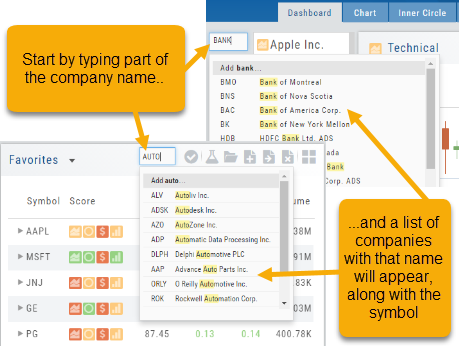
You can search for symbols from several entry points including “Market” and “Watch”. Simply start typing all or part of the Company’s name and the system will proactively provide you with suggestions. You can use this feature anywhere including Insiders and Institutions.
For example, typing “Bank” in the Symbol box will bring up the stock symbols and names of companies with “bank” in their name.
Depending where you are in the Platform, clicking on the selected symbol while you are in:
The “Market” or “Watch” tab, it will be added to your currently open list of stocks.
The Dashboard of the “Research” Tab, it will automatically provide the top layer of information on the stock. As always, you are able to navigate to different areas or ‘drill down’.
Insider or Institutions of the “Research” Tab, the corresponding data will display, such as data by Quarter, the biggest buyers and sellers and more.
New Symbol Verification
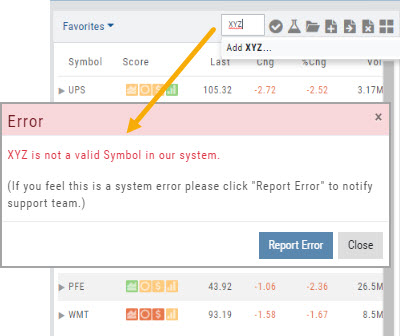
Symbols will automatically update if an invalid symbol is entered and a new symbol exists.
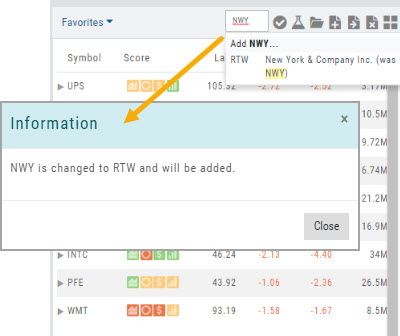
If a symbol is not recognized, an Error notice will popup notifying the user of this. By clicking “Report Error“, the system will automatically research, and, if valid – add the symbol to the platform.
This process helps eliminate incorrect symbols from being added to the platform.