Adding Virtual Account
Virtual Accounts are a great way to practice your trading. Used with the Journal features, you can track what you have mastered and what strategies need more practice.
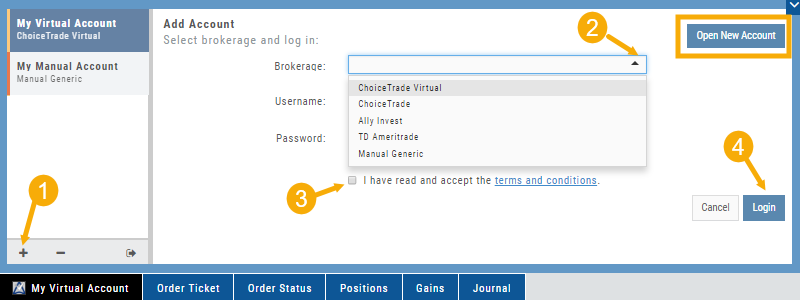
Add a Virtual Account in 4 steps – or watch the video below:
1. Click (+) icon from the Broker Menu
2. Select your Brokerage, Virtual or Manual Account & enter your Brokerage login information (Username & Password), if applicable
3. Read & Accept Terms and Conditions
4. Click “Login”
In fact – you can add an existing Live Brokerage account with ChoiceTrade, TD Ameritrade, E*Trade or Ally Invest using the same steps.
Ready to open a Live Account? Click “Open New Account” button, Select a Brokerage and Complete Steps to Open a Live Trading Account.