
Announcing the latest Release of feature and functionality enhancements to the trading platform to improve the investment/trading decision process.
Financial Coach: Use as additional input to assist you in making educated decisions.
Screener: Find/narrow down potential candidates for consideration in your research
Journal Analysis: Get feedback on your trading journey; what is working, what needs improvement, etc.
- Select feature from the Find Tab
- Type your inquiry
- Click “Send“. Refine by submitting additional questions, clicking “Send” after each one.
- To start a new Chat, click the “New Chat” button by the same name.
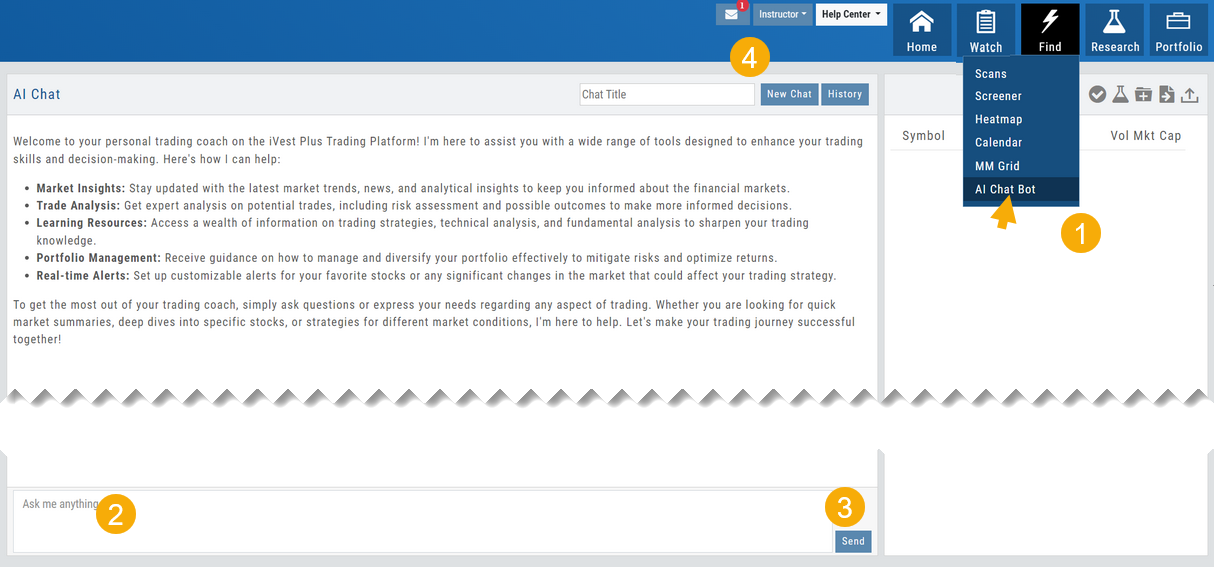
Each Chat result is automatically saved and accessed via the History button. The title is auto-generated based on the topic when the Chat is created. You can edit the title at any time.
AI capability: Financial Coach
Use the Power of AI with a Financial Market Coach. Some of the applications include:
- Insight on trading strategies and applications
- Guidance on Risk Management techniques
- Market trend analysis
- Information access covering technical to fundamental access
- Management guidance to minimize risk and optimize returns
Located within the Find Tab, this powerful research tool can gather and deliver market-related information while staying within the platform.
- Select feature from the Find Tab
- Type your inquiry in the “Ask me anything” box
- Click “Send“. Refine by submitting additional questions, clicking “Send” after each one.
- To start a new Chat, click the “New Chat” button by the same name.
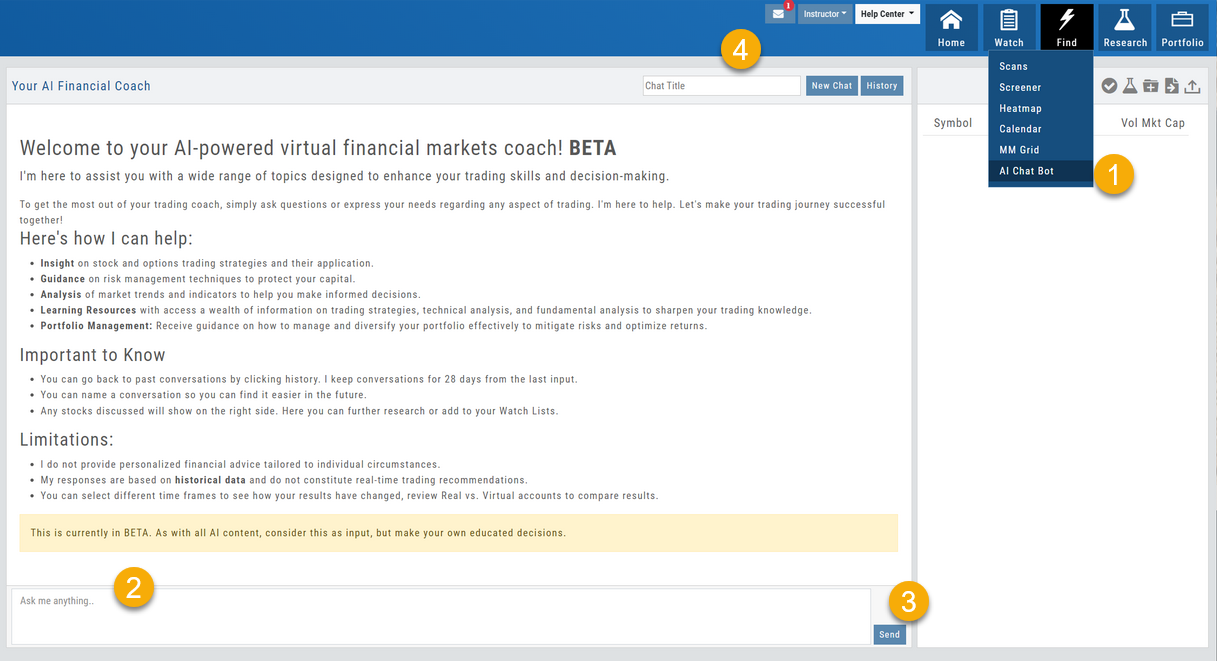 AI Chat Bot: the welcome screen listing how it can help (insight, guidance, analysis, learning resources, portfolio management), things to know (history kept 28 days, name your conversations, discussed stocks appear on the right), its limitations, and the Ask me anything box” class=”wp-image-795″/>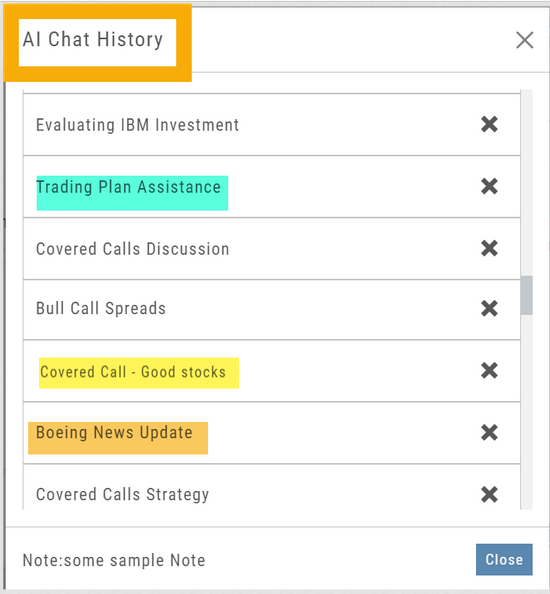
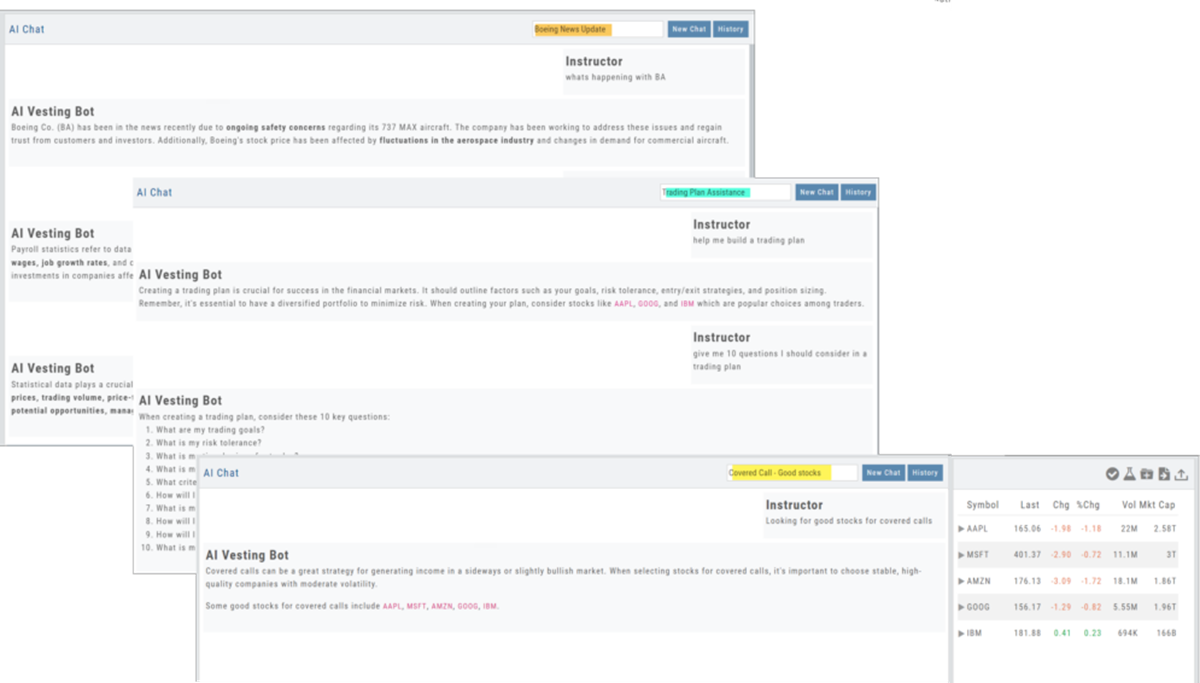
Each Chat result is automatically saved and accessed via the History button. The title is auto-generated based on the topic when the Chat is created. You can edit the title at any time.
Inquiry results that include symbols will be displayed on the right panel of the screen, allowing the ability to navigate to other areas of the platform for that symbol.
To remove any Chat, simply click the ‘x’ for that entry.
Screener AI
Located on the Screener page, click the AI button to enter your inquiry in the “Ask Me Anything” box at the bottom of the table, then click “Send“
Example: What criteria should I use to find Covered Call candidates?
Read more about Screener AI Functionality
Journal AI Analysis
Journal AI Analysis will review your account activity and provide insight, observations and recommendations.
Note: Analysis applied to closed positions only. This feature does not forecast unrealized gains or losses.
AI provides almost instant feedback on your trading results.
- Select the account(s) you’d like to review.
- Adjust the time period covered – if you don’t want to use the default 12-month view.
- Click the AI button.
Within a few moments, you’ll receive a summary of Strengths, Weaknesses, Observations, and Recommendations for improving results.
More on Journal AI
Change Log
- Key Ratio and Compare Views are session sticky
- Seasonal chart corrected to show Price
- Cancel/Reuse display on Credit orders corrected
- Stock data restored on Scan backtest
- Staged Order display on chart functionality corrected
- Schwab Order Ticket close orders corrected